Are you confident that your application is truly secure? One overlooked vulnerability can open the door to costly breaches and lost trust.
That’s why having a clear, step-by-step Application Security Audit Checklist is essential for anyone serious about protecting their software. This checklist isn’t just a list—it’s your roadmap to uncover hidden weaknesses, strengthen defenses, and ensure your app stands strong against threats.
Keep reading, and you’ll discover exactly what you need to check, how to spot risks before they become problems, and the smart steps to safeguard your users and your reputation. Don’t leave your security to chance—let’s get your application audit-ready.
Audit Preparation
Define Audit Scope clearly to focus on key parts of the application. Decide which components and features will be checked. This helps save time and resources during the audit.
Gather Documentation such as architecture diagrams, codebase details, and security policies. These documents give a full view of the application’s design and security setup. Having clear records aids the audit process.
Assemble Audit Team with members having the right skills. Include developers, security experts, and testers. A diverse team ensures thorough checking from different angles. Coordination and communication are essential for success.

Application Architecture Review
Analyze Data Flow to understand how information moves through the application. Check each step where data is received, processed, and stored. Make sure sensitive data is encrypted and protected from leaks.
Identify Entry Points such as login screens, APIs, and forms. These points are where attackers often try to enter. Test them carefully for weak spots like poor input validation or missing authentication.
Assess Third-party Integrations to ensure they do not introduce risks. Verify that external services follow security best practices. Keep all third-party components updated to fix known vulnerabilities.
Authentication And Authorization
Review User Authentication Methods by checking if passwords are strong and stored safely. Use multi-factor authentication to add extra security. Verify that login attempts are limited to stop attackers from guessing passwords.
Check Role-based Access Controls to ensure users only access what they need. Each user role should have clear permissions. Avoid giving admin rights to regular users to reduce risks.
Test Session Management by confirming sessions expire after inactivity. Use secure cookies to protect session data. Make sure users log out properly and cannot reuse old sessions.
Input Validation
Validate user inputs to ensure only expected data is accepted. Use strict rules to check input length, type, and format. Reject inputs with suspicious characters or patterns.
Sanitize data entries by cleaning inputs before processing or storing them. Remove or encode harmful characters that could cause issues later. This step protects the system from corrupted or unsafe data.
Prevent injection attacks by avoiding direct insertion of user inputs into commands or queries. Use prepared statements or parameterized queries. This stops hackers from injecting malicious code into the system.
Security Testing Techniques
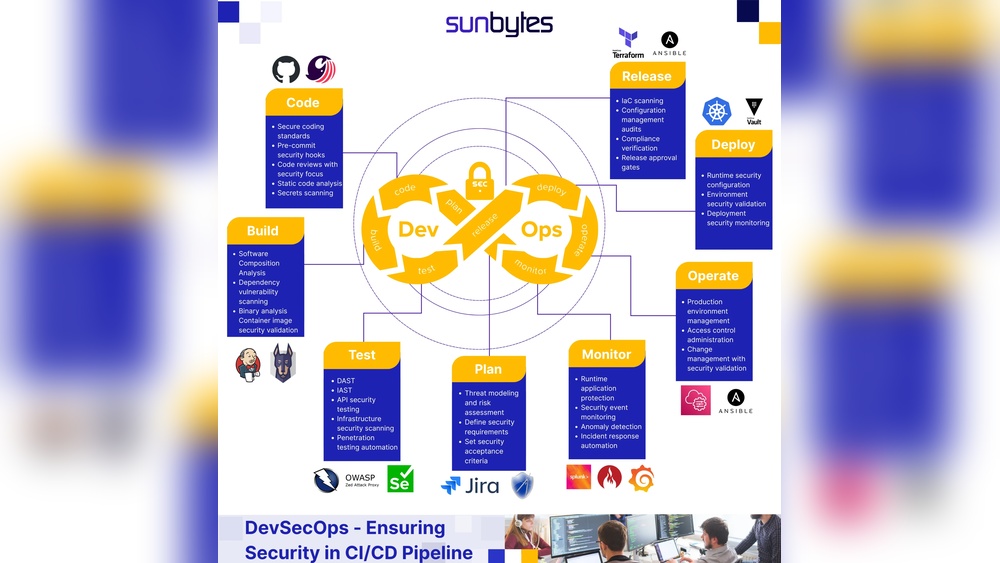
Static Application Security Testing (SAST) scans source code for security flaws without running the program. It finds bugs early in the development phase. Developers get feedback on vulnerable code to fix before release.
Dynamic Application Security Testing (DAST) tests the running application. It simulates attacks to discover real-time weaknesses. This method checks the app’s behavior under attack, revealing issues missed by code reviews.
Penetration Testing is a manual or automated process. Experts try to break into the system to find security gaps. It helps understand how hackers could exploit the app and improve defenses.
Vulnerability Management
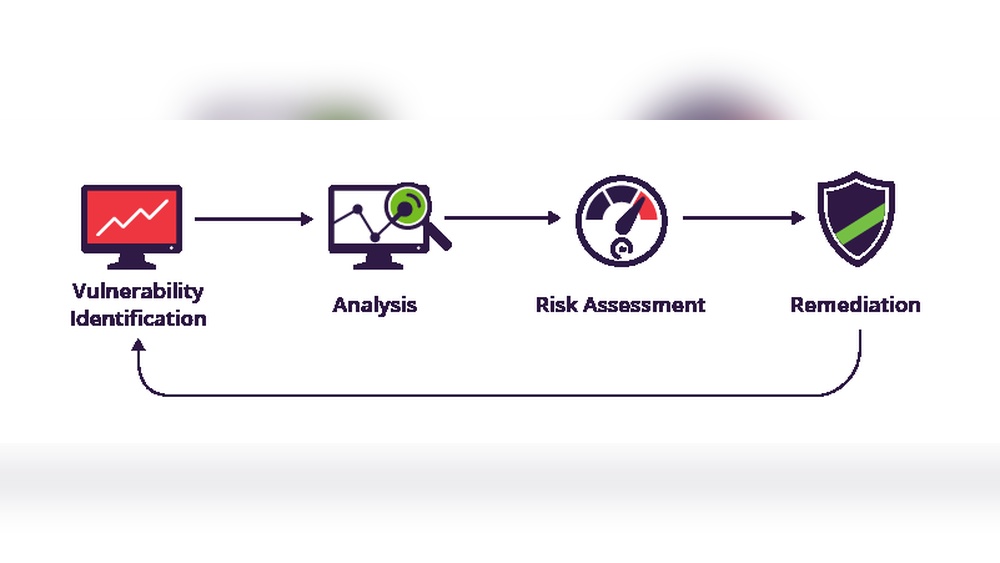
Scan dependencies regularly to find security flaws early. Many apps use third-party libraries. These can have hidden vulnerabilities. Use automated tools to check all dependencies. This helps prevent attacks from weak points.
Monitor vulnerability feeds daily. These feeds report new security issues fast. Staying updated lets teams react quickly. Subscribe to trusted sources for alerts. This keeps your application safer.
Patch management must be a clear, repeatable process. Fix vulnerabilities as soon as updates are available. Test patches before applying them to production. Keep detailed records of all patch activities. This reduces risks from known bugs.
Logging And Monitoring
Implement proper logging to capture all important events. Logs should record user actions, errors, and security incidents. Use consistent formats for easy review. Protect logs from unauthorized changes to maintain log integrity. Regularly check logs to spot any suspicious activity or tampering.
Set up real-time alerts to notify administrators about unusual events. Alerts help catch problems early and reduce response time. Prioritize alerts based on severity for efficient handling. Combine logging with monitoring tools to keep the application secure and stable.

Data Protection
Encrypt sensitive data to protect it from unauthorized access. Use strong encryption methods like AES-256. Store encryption keys securely, separate from the data.
Secure data transmission by using protocols such as TLS. Avoid sending data over unencrypted channels. Always verify SSL/TLS certificates to prevent man-in-the-middle attacks.
Backup and recovery procedures must be in place. Regularly back up data and store copies offsite. Test recovery processes often to ensure data can be restored quickly and safely after incidents.
Compliance And Standards
Verify regulatory requirements by checking laws like GDPR, HIPAA, or PCI-DSS. Ensure the application meets these rules to avoid legal problems. Keep records of all compliance checks for future reference.
Align with security frameworks such as NIST, ISO 27001, or OWASP. These frameworks provide clear rules for securing applications. Following them helps protect data and systems effectively.
Document audit findings clearly and thoroughly. Include what was checked, results, and any risks found. This documentation helps track progress and guides future security improvements.
Post-audit Actions
Start by listing all security issues found during the audit. Rank these issues by risk level and potential impact. Focus first on high-risk vulnerabilities that could cause major damage.
Create a clear improvement plan to fix the problems. This plan should include steps, responsible people, and deadlines. Make sure the plan is easy to follow and update.
Set up follow-up reviews to check progress regularly. These reviews help catch new issues early and ensure fixes work well. Regular checks keep the application safe and secure over time.
Frequently Asked Questions
What Is An Application Security Audit Checklist?
An application security audit checklist is a structured list of tasks. It helps identify security weaknesses in software applications. The checklist guides thorough reviews to protect apps from vulnerabilities and threats.
Why Is Application Security Auditing Important?
Auditing ensures your application is safe from cyber threats. It helps detect and fix vulnerabilities before attackers exploit them. Regular audits improve software reliability and protect sensitive data.
What Key Areas Does The Checklist Cover?
The checklist covers input validation, authentication, authorization, and logging. It also examines secure coding, dependency management, and data protection measures. These areas ensure comprehensive security coverage.
How Often Should Application Security Audits Be Conducted?
Audits should be performed regularly, ideally every release cycle. Frequent reviews catch new vulnerabilities introduced by updates or changes. Continuous auditing strengthens overall application security posture.
Conclusion
A thorough application security audit protects your software and users. Use this checklist to find and fix security gaps quickly. Regular audits help keep your app safe from new threats. Stay alert and update your security measures often. Clear steps make audits easier and more effective.
Protect your data and maintain user trust with good security practices. Start auditing today to build stronger, safer applications.
Read More
- Vendor Software Contract Review: Essential Tips for Risk-Free Deals
- It Procurement Audit Guide: Ultimate Tips for Success
- Software Asset Management Consulting: Maximize Efficiency & Savings
- Software Vulnerability Audit: Essential Tips to Secure Your Code
- Devsecops Audit Assessment: Boost Security with Expert Insights
- Open Source License Compliance: Essential Tips for Risk-Free Use
- Microsoft License Compliance Audit: Essential Tips to Stay Compliant
- Adobe License Compliance Review: Essential Tips for Risk-Free Use
- Enterprise Software Compliance Review: Essential Tips for Success
- Application Portfolio Audit Cost: Uncover Hidden Savings Today